2DMappingLayout

      Description


      2DMappingLayout: Precision Spatial Planning Made Simple

      Transform Complex Spaces into Clear, Actionable Plans.

      Product Overview

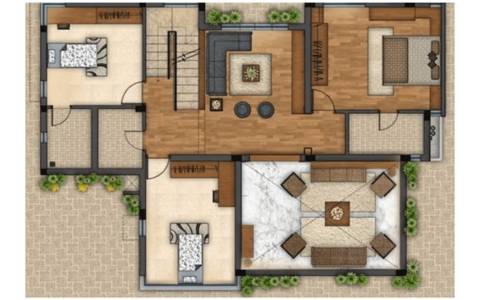
      2DMappingLayout is a powerful, intuitive software solution designed for professionals who need to create, manage, and visualize detailed two-dimensional layouts and maps with unparalleled precision. From intricate floor plans and facility layouts to event mapping and urban planning, 2DMappingLayout empowers users to design, optimize, and communicate spatial information effectively, minimizing errors and maximizing efficiency.

      Say goodbye to cluttered sketches and cumbersome CAD files. With 2DMappingLayout, you gain a streamlined workflow that turns your vision into perfectly scaled, easy-to-understand representations, fostering seamless collaboration and informed decision-making across all your projects.

      Key Features

      • Intuitive Drag-and-Drop Interface

        • A user-friendly environment designed for quick adoption and efficient workflow. Create complex layouts with simple clicks and movements, no extensive CAD expertise required.
      • Precision Drawing & Editing Tools

        • Access a comprehensive suite of tools including lines, arcs, polylines, circles, rectangles, and custom shapes. Enjoy precise snapping, alignment, and measurement functionalities to ensure absolute accuracy.
      • Extensive Object Libraries & Symbol Sets

        • Choose from a vast collection of industry-specific symbols and objects (furniture, equipment, utilities, vehicles, event assets, etc.). Easily customize, import, or create your own symbols for maximum flexibility and brand consistency.
      • Advanced Layer Management

        • Organize your layouts with unlimited layers. Toggle visibility, lock layers, assign properties, and manage information effortlessly, allowing for focused views and easy collaboration.
      • Smart Dimensioning & Annotation

        • Automatically generate precise dimensions (linear, angular, radial) and add rich text annotations, labels, and callouts to convey critical information clearly. Customizable styles ensure professional output.
      • Flexible Import & Export Options

        • Seamlessly import existing plans and data from various formats including DWG, DXF, PDF, JPG, PNG, and more. Export your finished layouts to high-resolution images, PDF, or CAD formats for easy sharing and integration with other software.
      • Scalability & Grid Systems

        • Work with real-world scales and customizable grid systems. Ensure your layouts are always proportional and accurate, regardless of the project size.
      • Area & Measurement Calculations

        • Automatically calculate areas, perimeters, and distances within your layout. Generate reports for material estimates, space utilization, and cost analysis.
      • Customizable Templates

        • Save frequently used layouts, settings, and symbol arrangements as templates to kickstart new projects and maintain consistency across your work.
      • Collaboration & Sharing Capabilities (Pro Version)

        • Share projects with team members, track revisions, and gather feedback in real-time. Facilitate smooth communication and accelerated project timelines.

      Benefits

      • Boost Efficiency: Reduce design time by up to 50% with intuitive tools and pre-built assets, allowing you to focus on strategy rather than tedious drawing.
      • Enhance Accuracy: Minimize costly errors and rework through precise measurements, snapping, and comprehensive dimensioning.
      • Improve Communication: Create clear, professional, and easily understandable layouts that effectively convey your vision to clients, stakeholders, and teams.
      • Optimize Space Utilization: Experiment with different arrangements to maximize efficiency, flow, and safety within any given area.
      • Streamline Project Management: From initial concept to final execution, 2DMappingLayout helps you plan, visualize, and manage all spatial aspects of your projects.
      • Reduce Costs: Better planning leads to fewer mistakes, less material waste, and more efficient resource allocation.

      Ideal For

      • Architecture & Interior Design: Floor plans, furniture layouts, space planning.
      • Construction & Facilities Management: Site plans, equipment placement, safety routes, HVAC layouts.
      • Event Planning: Venue layouts, booth arrangements, seating charts, crowd flow management.
      • Retail & Commercial Planning: Store layouts, product placement, customer flow analysis.
      • Logistics & Warehouse Management: Pallet racking, workflow optimization, inventory storage.
      • Urban Planning & Real Estate: Property boundary maps, development proposals, landscape design.
      • Manufacturing: Factory floor layouts, assembly line optimization.
      • Emergency Services & Security: Tactical mapping, incident command planning.

      Technical Specifications (Standard Edition)

      • Operating Systems: Windows 10/11 (64-bit), macOS 10.15 Catalina or later.
      • Processor: Intel Core i5 or equivalent (i7 or higher recommended).
      • RAM: 8 GB (16 GB or more recommended for large projects).
      • Storage: 500 MB free disk space for installation; additional space for project files.
      • Display: 1920x1080 resolution or higher.
      • Supported Import Formats: DWG, DXF, PDF, JPG, PNG, BMP, TIFF, SVG.
      • Supported Export Formats: PDF, JPG, PNG, DXF, SVG.

      How It Works

      1. Start Your Project: Begin with a blank canvas, import an existing drawing or image, or select a pre-designed template.
      2. Design & Layout: Use precise drawing tools, drag-and-drop objects from libraries, and leverage layer management to build your 2D map.
      3. Refine & Annotate: Add dimensions, labels, and notes to fully communicate your plan. Utilize calculation tools for analysis.
      4. Export & Share: Output your professional layout in your desired format for presentations, printing, or integration into other software.

      Ready to visualize your space with unparalleled precision?

      Download Your Free Trial Today!

      Request a Personalized Demo

      View Pricing Plans

      What Our Users Say

      "2DMappingLayout has revolutionized how we create event plans. It's incredibly intuitive and the precision tools save us hours. Highly recommended!" — Sarah J., Lead Event Coordinator

      "As an architect, I appreciate the robust import/export options and the comprehensive object libraries. It seamlessly integrates into our workflow." — Mark T., Principal Architect

      Frequently Asked Questions

      • Is 2DMappingLayout compatible with AutoCAD files?
        • Yes, 2DMappingLayout supports both DWG and DXF import and export, ensuring full compatibility with AutoCAD and other CAD software.
      • Can I create custom object libraries?
        • Absolutely! You can easily create, save, and manage your own custom symbols and object libraries for specialized projects or branding.
      • Do you offer team licenses?
        • Yes, we offer flexible team and enterprise licensing options, including features for enhanced collaboration and centralized management. Please contact sales for details.

      Tags: 2DMappingLayout