Description
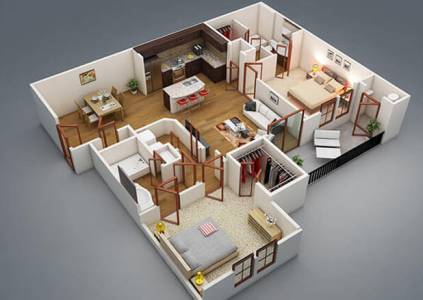
Plan Elevation 3D: Transform Your 2D Designs into Stunning 3D Realities
Unleash Your Vision: From Blueprint to Brilliance
Tired of flat, lifeless blueprints and struggling to convey your design vision? Plan Elevation 3D is the revolutionary software that effortlessly converts your 2D floor plans and elevations into immersive, interactive 3D models. Perfect for architects, interior designers, builders, real estate professionals, and homeowners alike, Plan Elevation 3D bridges the gap between concept and reality, making visualization intuitive, accurate, and incredibly fast.
What is Plan Elevation 3D?
Plan Elevation 3D is an intuitive, powerful design application engineered to streamline your workflow and enhance client communication. By leveraging intelligent recognition and a vast library of assets, it empowers you to transform simple lines into fully-rendered, explorable 3D spaces, complete with realistic materials, lighting, and furnishings.
Key Features & Capabilities:
- Intelligent 2D to 3D Transformation:
- Seamless Import: Import your existing 2D CAD files (DWG, DXF, PDF), image files (JPG, PNG), or sketch directly within the application.
- Smart Recognition: Our advanced engine intelligently interprets your lines as walls, doors, windows, and structural elements, automatically generating a 3D model in seconds.
- Elevation Generation: Automatically create precise front, rear, and side elevations directly from your 3D model, ensuring consistency and accuracy across all views.
- Extensive Asset Libraries:
- Material & Texture Library: Access a vast collection of realistic materials (wood, stone, brick, paint, fabric, glass, metal) to apply to surfaces, walls, floors, and roofs. Customize properties like reflectivity, bump, and transparency.
- Rich Object & Furniture Library: Furnish your spaces with thousands of pre-designed 3D objects including furniture (beds, sofas, tables), appliances, fixtures (lighting, plumbing), landscaping elements, and decorative items. Easily drag-and-drop and resize.
- Dynamic Visualization & Rendering:
- Real-time 3D Viewer: Instantly view changes as you make them in a fully navigable 3D environment. Orbit, zoom, and pan with ease.
- Interactive 3D Walkthroughs & Flythroughs: Create captivating guided tours of your designs for clients. Experience the space as if you were truly there.
- Advanced Lighting & Shadow Control: Simulate natural sunlight with adjustable time of day and geographic location. Add artificial light sources (spotlights, ambient lights) to create desired moods and highlight features.
- Photorealistic Rendering: Generate stunning, high-quality images of your designs with advanced rendering options, showcasing textures, shadows, and reflections with incredible realism.
- Design & Editing Tools:
- Intuitive Drawing Tools: Create new floor plans or modify existing ones with easy-to-use line, arc, and shape tools.
- Layer Management: Organize your design elements with comprehensive layer controls, improving complex project management.
- Dimensioning & Annotation: Add precise dimensions, labels, and annotations directly to your 2D plans and 3D views for clear communication.
- Customization: Edit object properties, materials, and sizes to match your exact specifications.
- Collaboration & Export:
- Versatile Export Options: Export your projects in various formats, including 2D images (JPG, PNG), 3D models (OBJ, FBX, SKP), PDF, and even video walkthroughs.
- Cloud Integration: (Optional Add-on) Save and share projects in the cloud, enabling seamless collaboration with team members and clients from anywhere.
How It Works:
- Import or Draw: Start by importing your existing 2D plan (DWG, PDF, image) or use our drawing tools to create a new layout from scratch.
- Automate 3D: With a single click, Plan Elevation 3D transforms your 2D lines into a robust 3D model, automatically generating walls, floors, and a basic roof structure.
- Refine & Furnish: Add doors, windows, and customize dimensions. Then, dive into our extensive libraries to apply materials, textures, and furnish your space with furniture, fixtures, and landscaping.
- Light & Render: Adjust lighting conditions, add artificial lights, and generate stunning photorealistic images or interactive walkthroughs.
- Present & Share: Export your visuals in various formats to share with clients, colleagues, or contractors, ensuring everyone is on the same page.
Who Is Plan Elevation 3D For?
- Architects: Rapidly prototype designs, generate client presentations, and ensure accurate elevation views.
- Interior Designers: Experiment with layouts, materials, and furniture in real-time to create dream interiors.
- Builders & Developers: Visualize projects before construction, identify potential issues, and create compelling marketing materials.
- Real Estate Professionals: Offer immersive virtual tours and stunning visuals to potential buyers, enhancing property listings.
- Students: Learn and apply architectural visualization concepts with an easy-to-use yet powerful tool.
- Homeowners & DIY Enthusiasts: Plan renovations, additions, or redecorate your space with confidence and clarity.
Why Choose Plan Elevation 3D?
- Accelerate Your Workflow: Cut down design time significantly by automating the 2D to 3D conversion process.
- Enhance Client Communication: Present designs in an engaging, easy-to-understand 3D format, reducing misunderstandings and speeding up approvals.
- Ensure Precision: Maintain consistency between 2D plans, elevations, and 3D models, minimizing errors and rework.
- Empower Creativity: Focus on design innovation rather than tedious rendering tasks.
- Cost-Effective: Reduce reliance on external rendering services and bring professional visualization capabilities in-house.
Ready to bring your architectural dreams to life?
System Requirements: Compatible with Windows 10/11 (64-bit) and macOS (Intel/Apple Silicon). Minimum 8GB RAM, dedicated graphics card recommended for optimal performance.